Why Training Your Team on Claude Is the Smartest Move Any CEO Can Make in 2026 (And How to Actually Do It)
Apr 27, 2026
The smartest thing any manager, business owner, or CEO could do right now is train their team on Claude. Not buy more software. Not hire more people. Not run another offsite. Train your team on Claude.
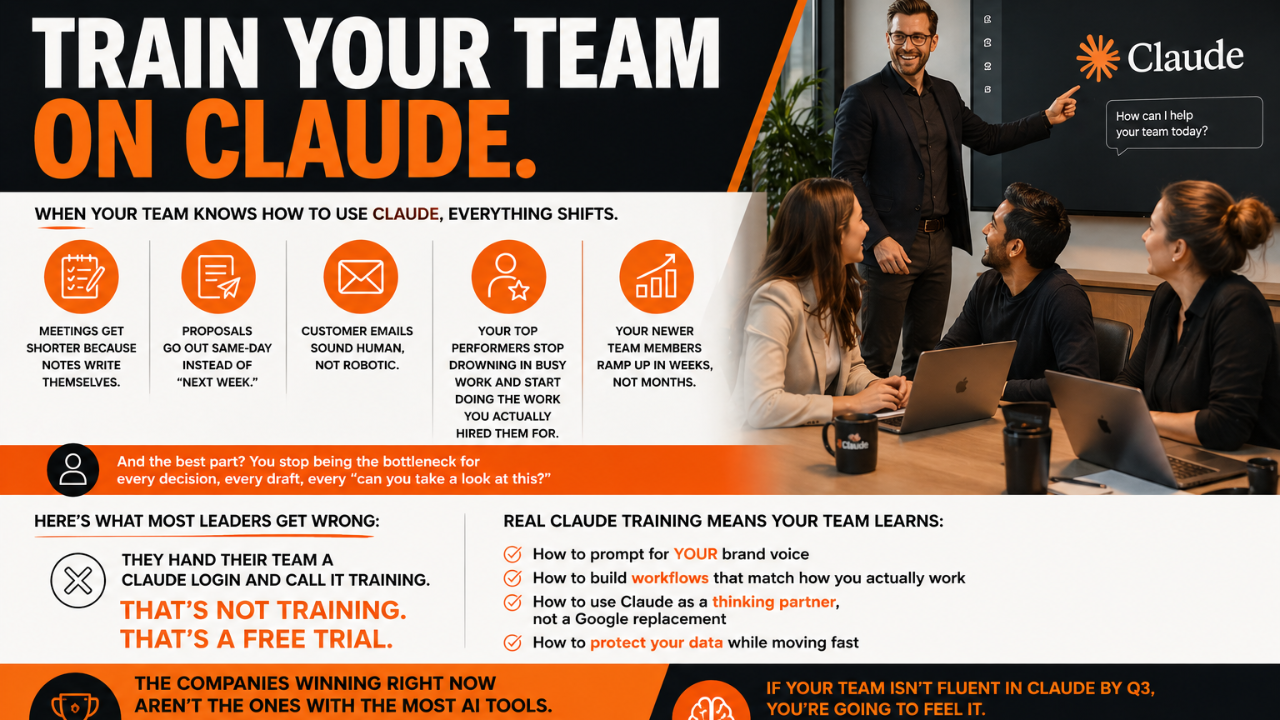
Here's why: when your team actually knows how to use Claude, the things that have been quietly draining your business start to fix themselves. Proposals go out same-day instead of next week. Customer emails sound human instead of robotic. Meeting notes write themselves. Your top performers stop drowning in busy work and start doing the work you actually hired them for.
This post breaks down exactly what changes when a team gets trained on Claude, why most companies do it wrong, and the 5-step framework I use with corporate teams to roll Claude out the right way.
Why Claude Training Is the Highest-Leverage Move You Can Make Right Now
Most leaders are still treating AI like a software purchase. They buy seats. They send a Slack announcement. They expect productivity to magically go up.
It doesn't.
Buying Claude licenses without training is like handing your team a Tesla and assuming they know how to drive. They might figure out how to start it. They will not figure out autopilot, navigation, or what makes it different from the car they drove for 10 years.
Here's what the data is showing across companies who train their teams on Claude versus those who don't:
- Trained teams use Claude 4 to 6 times more often than untrained teams with the same access.
- Trained teams report saving 8 to 15 hours per person per week.
- Untrained teams typically use Claude for low-leverage tasks (rewording emails) and miss the high-leverage ones (proposals, strategic analysis, research, planning).
- Companies with structured AI training see ROI in 30 to 60 days. Companies without it often abandon the tool within 90 days.
The gap isn't the tool. The gap is the training.
What Actually Changes When Your Team Knows How to Use Claude
Let me get specific. These are the shifts I see inside companies after a 6-week Claude training rollout:
Meetings get shorter (and actually useful)
Notes write themselves. Action items get pulled out automatically. The 60-minute meeting becomes 30, because nobody's scrambling to document anything in real time. One client cut their weekly leadership meeting from 90 minutes to 45 within the first month.
Proposals go out same-day
The proposal that used to take 4 hours now takes 45 minutes. Same quality, same brand voice, same custom touches. Your sales team stops losing deals because the proposal took too long to send.
Customer communication sounds human again
When the team is trained on brand voice prompting, every email, every reply, every follow-up sounds like your company, not a generic AI assistant. The robotic AI tone is a training problem, not a Claude problem.
Top performers stop being bottlenecks
Your best people stop being the ones everyone waits on. They use Claude to delegate to themselves, doubling their output without doubling their hours.
New hires ramp up in weeks, not months
A trained team has prompt libraries, internal Projects, and standard workflows. New hires plug into those on day one. The 90-day ramp becomes 3 weeks.
You stop being the bottleneck
This is the one nobody talks about. As the leader, you're the one approving every draft, every email, every "can you take a quick look at this?" When your team knows how to use Claude as a self-checking thinking partner, that volume drops by 50% or more.
Where Most Companies Get Claude Training Wrong
If you've already tried rolling AI out to your team and it didn't stick, you're not alone. Here are the four mistakes I see most often:
Mistake 1: Treating logins as training
You bought 20 seats. You sent the link. You called it a rollout. That's not training. That's a free trial with extra steps.
Mistake 2: Generic AI training instead of Claude-specific
Claude works differently than ChatGPT, Gemini, and Copilot. Different strengths, different prompting style, different best use cases. Generic "AI for business" training teaches your team to use AI in a generic way. Claude-specific training teaches them to use Claude well.
Mistake 3: No connection to actual workflows
If the training is theory ("here's what AI can do"), nothing changes. If the training is built around the actual tasks your team does every week, everything changes.
Mistake 4: One-and-done
A 90-minute lunch-and-learn is not training. Real fluency takes 4 to 6 weeks of structured practice, real assignments, and a feedback loop. Anything shorter is awareness, not capability.
The Claude Team Rollout Method: 5 Steps to Real Fluency
This is the exact framework I use when I train corporate teams on Claude. It works for a 5-person team and a 50-person team. The principles don't change.
Step 1: Pick the 3 highest-leverage use cases for your team
Don't try to teach everything. Pick the three tasks where your team spends the most time AND Claude can help the most. For most companies, those are:
- Writing (emails, proposals, content, reports)
- Research and analysis (competitive intel, summaries, document review)
- Planning (project plans, meeting prep, strategic thinking)
Train deep on three. Don't go shallow on twenty.
Step 2: Build a brand voice prompt your whole team uses
This single prompt is worth its weight in gold. It's the master instruction that makes Claude sound like your company. It includes your tone, your hard-no phrases, your preferred sentence structure, your audience, and your point of view. Once it's built, every team member uses it as the foundation for client-facing work.
Step 3: Teach prompting fundamentals (the right way)
Good prompting is just clear communication. Train your team on the four essentials: context, role, task, and format. Tell Claude who you are, who Claude should be, what you need, and how you want it back. Skip the "10x prompt engineer" hype. The basics are the basics.
Step 4: Build a team prompt library
Every time someone on the team writes a prompt that works really well, it goes in the shared library. Within 30 days, you have 30+ tested prompts your whole team can reuse. Within 90 days, your team has more institutional AI knowledge than companies 10x your size.
Step 5: Run a 4-to-6-week practice cycle with weekly check-ins
Real fluency happens through reps. Weekly assignments. Real work. Weekly check-ins where the team shares what worked, what didn't, and what they'd do differently. By week 6, the team isn't using Claude. They're thinking with Claude.
The ROI Math Most CEOs Aren't Running
Let's do the math out loud, because this is the part that should make any CEO sit up.
Say you have a 5-person team. Each person saves 10 hours per week after training. That's 50 hours a week back to the business, or roughly 200 hours per month of recovered capacity.
At a $50/hour internal rate, that's $10,000 a month in capacity. At $100/hour for senior team members, it's $20,000 a month. Multiplied across a year, that's $120,000 to $240,000 in returned capacity from one training rollout.
And that's just the time math. It doesn't include faster proposal turnaround, better client retention, more consistent brand voice, or the leadership time you get back when you're no longer the bottleneck.
The companies winning right now aren't the ones with the most AI tools. They're the ones whose teams actually know how to use them.
What to Do This Week
If you're a manager, business owner, or CEO and you've been thinking about rolling Claude out to your team, here's the action list:
- Audit current AI use. Who on your team is actually using Claude (or any AI)? How often? For what?
- Pick your three highest-leverage use cases. Where would AI fluency move the needle the fastest?
- Decide on a training path. DIY with structured curriculum, hire someone to run the rollout, or bring in a corporate AI training partner.
- Set a 60-day review date. Mark the calendar. In 60 days, review hours saved, output quality, and team confidence.
The teams that get fluent on Claude in 2026 are going to outpace the teams that don't. It's not a maybe. It's already happening.
Frequently Asked Questions
What is Claude AI and how is it different from ChatGPT?
Claude is an AI assistant built by Anthropic, designed to handle long, complex tasks like writing, analysis, research, and coding. Compared to ChatGPT, Claude is known for being more thoughtful with nuance, better at long-form writing that sounds human, and stronger at following detailed instructions. Many teams use both, but Claude tends to be the favorite for client-facing work, proposals, content, and anything where tone and accuracy matter.
How long does it take to train a team on Claude?
A focused Claude training program takes 4 to 6 weeks for a team to go from zero to confident. Most teams see real productivity gains within the first 2 weeks once they learn the basics of prompting and start building their own workflows. Full fluency, where Claude becomes a daily thinking partner, usually clicks around week 6.
How much time can a team save by using Claude?
Teams trained on Claude typically save 8 to 15 hours per person per week. The biggest time savings show up in writing tasks (emails, proposals, content), research, summarizing meetings, and drafting first versions of any document. The savings compound over time as the team builds workflows and prompt libraries they reuse.
Is Claude safe to use with company data?
Claude offers business plans (Claude for Work, Team, and Enterprise) with stronger privacy protections, including not training on your conversations by default. For sensitive data, use the business plan rather than the free or personal plan, set clear team guidelines on what can and cannot be pasted into any AI tool, and review Anthropic's data handling policies before rollout.
What does Claude training actually cover?
Real Claude training covers four pillars: prompting fundamentals (how to ask for what you actually want), brand voice setup (so Claude sounds like your company, not generic AI), workflow building (turning repeated tasks into reusable prompts and Projects), and team-wide use cases (writing, research, planning, customer communication, and more).
Do you need to be technical to use Claude effectively?
No. Claude is designed for plain English. If you can write a clear email, you can prompt Claude. The skill that matters most is being specific about what you want, who it's for, and what good looks like. That is a communication skill, not a tech skill, which is why Claude works so well for non-technical teams in marketing, sales, operations, and leadership.
What ROI can a business expect from training a team on Claude?
Most businesses see ROI within 30 to 60 days of training. The math: if 5 team members each save 10 hours per week, that's 200 hours per month back, which at a $50/hour internal rate equals $10,000 in monthly capacity. Beyond hours saved, businesses report faster proposal turnaround, better client communication, more consistent brand voice, and reduced bottlenecks at the leadership level.
Ready to Train Your Team on Claude?
If your team isn't fluent in Claude by Q3, you're going to feel it. The companies investing in real AI training right now are about to put serious distance between themselves and everyone else.
Want help making it happen? Grab Jam's free AI Starter Toolkit at jamout.ai to get the exact prompts, frameworks, and tools we use with corporate teams. Or, if you want a done-for-you training program for your team, check out Training JAM on the site. Either way, the time to train your team is now.
Build Your Business with AI — Even If You’re Overwhelmed, Busy, or Just Starting Out
Club Jam gives you the tools, training, and AI team to launch, automate, and grow your business — all for $47/month. No tech confusion. Just fast wins.